프롬프트
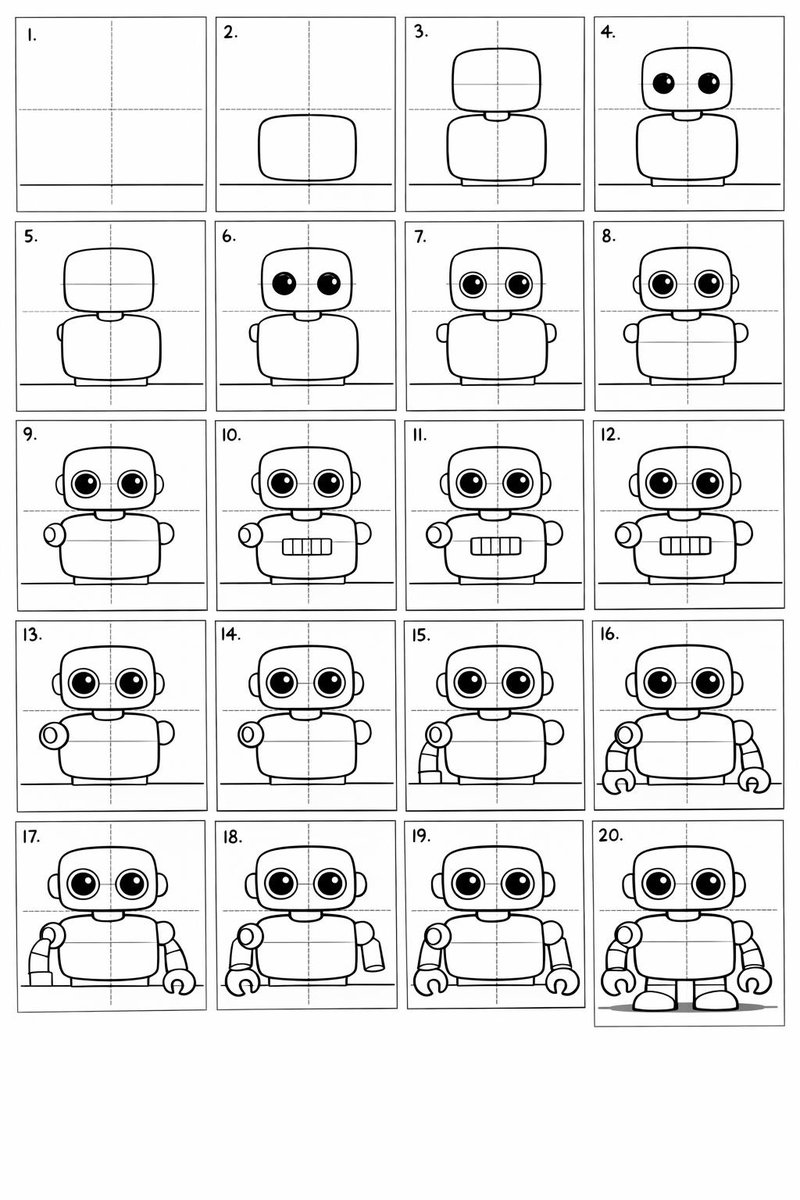
Create a 20-panel layout guide for drawing a cute cartoon robot. Each panel keeps everything from before and adds one clear change.

1. Light guide lines: vertical center, horizontal center, and a ground line.
2. Add torso: rounded rectangle above the ground.
3. Add torso centerline.
4. Add head: smaller rounded square above torso.
5. Add neck connector: short rounded block.
6. Add left eye circle.
7. Add right eye circle.
8. Add pupils inside both eyes.
9. Add thin rim rings around both eyes.
10. Add mouth rectangle below eyes.
11. Add evenly spaced vertical slats in the mouth.
12. Add left shoulder joint circle on torso side.
13. Add right shoulder joint circle.
14. Add left upper arm cylinder from left shoulder.
15. Add left elbow circle and left forearm cylinder.
16. Add left claw hand (base curve + two prongs).
17. Add right upper arm cylinder from right shoulder.
18. Add right elbow circle and right forearm cylinder.
19. Add right claw hand to match left.
20. Add legs and feet as simple blocks: two short legs from torso bottom and two rounded trapezoid feet, plus a small ground shadow.
프롬프트
20-Panel Cartoon Robot Drawing Guide Prompt
A detailed, step-by-step prompt for Nano Banana Pro (on LeonardoAi) instructing the model to create a 20-panel layout guide for drawing a cute cartoon robot, with each panel adding one specific, cumulative change, starting from basic guidelines to final details like claw hands and shadows.
Comic / Storyboardnano-banana-pro
모델
이 프롬프트로 만들기
아래 생성기를 사용하여 이 프롬프트를 사용 가능한 모델 및 설정과 리믹스하세요.
제출한 후 여기에 새 작업이 표시됩니다.